Send and Receive Money with Zelle®
Send money to people you trust, get paid quickly and request payments right from your CCBMobile app.







|
Get paid fast. Accept payments from customers without waiting for cash or checks, and pay vendors, suppliers or employees directly from your bank account in minutes.1 |
Fast
Money sent with Zelle® is typically available in minutes.1
Convenient
It's all in your CCBMobile app – there's no separate app to download or balance to manage.
Direct
Money moves directly to your account, so it's ready to use without sending money from another payment app.
Private
All you need is an email address or U.S. mobile number, so you never have to share sensitive account information.

Money sent to you goes straight into your Capital City Bank account and is available to use within minutes.1
Send money in the moment to friends, family and others you trust, even if they have a different bank or credit union1.


Send payment requests with Zelle® and let friends and family pay you back directly from their bank account to yours. 2
Only send money to people and businesses you trust.
Always double check that you have correct recipient information.
Treat Zelle® like cash. Payments can't be canceled.
Look out for payment scam red flags:
What begins as a fraud alert ends with someone claiming to be your bank instructing you to send money to yourself or anyone else with Zelle®.
Someone who may even appear to be your bank asks you to share a one-time passcode.

Zelle® is a convenient way to send, receive, and request money with friends, family and others you trust through your bank or credit union’s mobile app or online banking. All you need is your recipient’s enrolled email address or U.S. mobile number, and money will be available to use in minutes. Your account information and activity stay private. Zelle® is currently live in more than 2,300 Financial Institutions, so you can send money to friends and family even if they don’t bank at Capital City Bank.1
Log into Capital City Bank Online Banking or the CCBMobile app and look for the .png) icon on your app toolbar.
icon on your app toolbar.
Enroll
If you have not already enrolled, follow the prompts to enter your e-mail address or U.S. mobile phone number. You will receive a one-time verification code. Enter it where prompted, accept terms and conditions, and you’re ready to start sending and receiving with Zelle®!
Send Money
In most cases, the money is available to your recipient in minutes.1
Request Money
Send money to friends, family, eligible small businesses and vendors you trust even if they have a different bank or credit union.
Since money is sent directly from your Capital City Bank account to another person’s bank account within minutes,1 it’s important to only send money to people you trust and always verify you have the correct recipient information.
For your security, we set limits for Zelle® payments sent from Capital City Bank accounts. There are no limits to the amount of money you can receive with Zelle®. However, remember that the person sending you money will most likely have limits set by their own financial institution on the amount of money they can send you.
Send Limits – Consumer & Eligible Business Accounts
| Client Type | Daily | Weekly | Monthly |
|---|---|---|---|
| Existing Clients |
$3,000 or
10 transactions
|
$6,000 or
30 transactions
|
$12,000 or
60 transactions
|
| Private Banking Clients |
$5,000 or
10 transactions
|
$10,000 or
30 transactions
|
$20,000 or
60 transactions
|
Limits are subject to change.
You can only cancel a payment if the person you sent money to hasn’t yet enrolled with Zelle®. To check whether the payment is still pending because the recipient hasn’t yet enrolled, you can go to the Activity Center within your CCBMobile app or Capital City Bank Online Banking service, choose the payment you want to cancel and select “Cancel This Payment.” If you do not see this option available, please contact our Client Service Center at 888.671.0400 for assistance with canceling the pending payment.
Think of sending money with Zelle® like sending cash. If the person you sent money to is already enrolled, the money is sent directly to their bank account and cannot be canceled. This is why it’s important to only send money to people you trust, and always verify the recipient information before sending money.
If you sent money to the wrong person, please immediately call our Client Service Center at 888.671.0400 so we can help you.
There’s no fee to send money with Zelle® from your enrolled Capital City Bank business account. However, Zelle® payments deposited into your business account will be charged a fee by Capital City Bank. Please refer to the Other Services & Fees disclosure for a complete listing of applicable fees.
You can only cancel a payment if the person you sent money to hasn’t yet enrolled with Zelle®. To check whether the payment is still pending because the recipient hasn’t yet enrolled, you can go to the Activity Center within your CCBMobile app or Capital City Bank Online Banking service, choose the payment you want to cancel and select “Cancel This Payment.” If you do not see this option available, please contact our Client Service Center at 888.671.0400 for assistance with canceling the pending payment.
Think of sending money with Zelle® like sending cash. If the person you sent money to is already enrolled, the money is sent directly to their bank account and cannot be canceled. This is why it’s important to only send money to people you trust, and always verify the recipient information before sending money.
If you sent money to the wrong person, please immediately call our Client Service Center at 888.671.0400 so we can help you.

Add Zelle® to your accepted payment methods for a faster, more convenient way of getting paid than accepting cash and checks.
Note: There is a $0.49 fee on payments received with a business account. Fees subject to change.*
Skip the hassle of cutting checks and accessing multiple online payment portals. Use Zelle® to send money directly from your bank account instead.


Send payment requests through Zelle® and let customers pay you directly from their bank accounts. 2
Create your unique Zelle® tag:
.png) icon on your app toolbar.
icon on your app toolbar.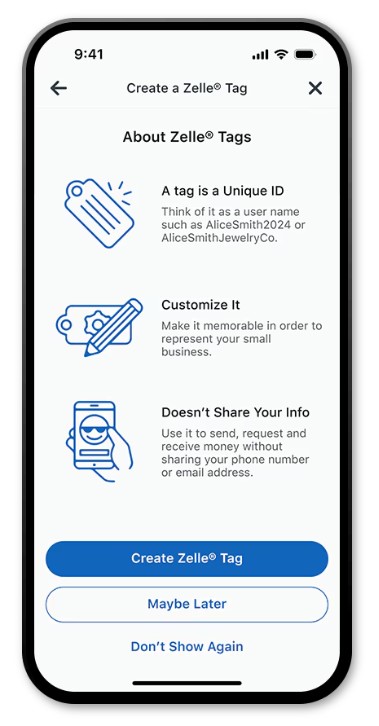
What is Zelle®?
Zelle® is a fast and easy way to send and receive money with friends, family and others you trust, even if they don’t bank with Capital City Bank.1 With just an email address or U.S. mobile phone number, you can send money to people you trust, regardless of where they bank.1
What types of payments can I make with Zelle®?
Zelle® is a great way to send money to family, friends, eligible businesses and vendors you are familiar with such as your personal trainer, babysitter or neighbor.1
Think of sending money with Zelle® like sending cash. Since money is sent directly from your Capital City Bank account to another person’s bank account within minutes,1 Zelle® payments cannot be canceled. This is why it’s important to only send money to people you trust, and always verify you have the correct recipient information before sending money.
Neither Capital City Bank nor Zelle® offers a protection program for any payments made with Zelle® – for example, if you do not receive the item you paid for or the item is not as described or as you expected.
Who can I send money to with Zelle®?
Send money to friends, family, eligible small businesses and vendors you trust even if they have a different bank or credit union.
Since money is sent directly from your Capital City Bank account to another person’s bank account within minutes,1 it’s important to only send money to people you trust and always verify you have the correct recipient information.
Can I pay a small business with Zelle®?
Some small businesses are able to receive payments with Zelle®. Ask your favorite small business if they accept Zelle®. Those that do can be paid directly from your CCBMobile app using their e-mail address, U.S. mobile number or QR code.
Who can use Zelle®?
Consumers and eligible small business clients who have a Capital City Bank checking account and are enrolled in online and mobile banking may use Zelle® to send or receive money with practically anyone with a U.S. bank account. Zelle® enrollment is also required and can be completed in your mobile or online banking service.
Can I use Zelle® with my business banking accounts?
Yes, if you have an eligible Capital City Bank business checking account. Commercial accounts or any account that utilizes treasury management-billed services are not eligible at this time.
Please contact our client support team at 888.671.4000. Qualifying imposter scams may be eligible for reimbursement.
Are there any fees to use Zelle® with Capital City Bank?
There’s no fee to send money with Zelle® from your enrolled Capital City Bank business account. However, Zelle® payments deposited into your business account will be charged a fee by Capital City Bank. Please refer to the Other Services & Fees disclosure for a complete listing of applicable fees.
Are there any limits for sending and receiving money with Zelle®?
For your security, we set limits for Zelle® payments sent from Capital City Bank accounts. There are no limits to the amount of money you can receive with Zelle®. However, remember that the person sending you money will most likely have limits set by their own financial institution on the amount of money they can send you.
Send Limits – Consumer & Eligible Business Accounts
Limits are subject to change.
How does Zelle® work?
When you enroll, your name, the name of your bank and the email address or U.S. mobile number you enrolled is shared with Zelle® (no sensitive account details are shared – those stay with Capital City Bank). When someone sends money to your enrolled email address or mobile number, Zelle® looks up the email address or mobile number in its directory and notifies Capital City Bank of the incoming payment. Capital City Bank then directs the payment into your Capital City Bank account, all while keeping your sensitive account details private.
How is Zelle® different from client-to-client payments? Which service should I use?
Client-to-client payments are the best option when you need to send money to another Capital City Bank client who also uses online or mobile banking. You will need the recipient’s email address used for online banking and the last four digits of the checking or savings account.
Zelle® gives you the option to send money to eligible customers with a US bank account, that do not have an account with Capital City Bank who do not have an account with Capital City Bank.
How long does it take to receive money with Zelle®?
Money is typically available to an enrolled recipient within minutes.
If you send money to someone who isn’t enrolled with Zelle®, they will receive a notification prompting them to enroll. After enrollment, the money will be sent directly to your recipient’s account, typically within minutes.
If your payment is pending, we recommend confirming that the person you sent money to has enrolled with Zelle® and that you entered the correct email address or mobile phone number.
If you’re waiting to receive money, you should check to see if you’ve received a payment notification via email or text message. If you haven’t received a payment notification, we recommend following up with the sender to confirm they entered the correct recipient information.
Still having trouble? Please contact the Capital City Bank Client Service Center toll-free at 888.671.0400.
When is my Zelle® payment deducted from my account?
Payments are debited at the same time you request money to be sent and receive the "Success confirmation" notice.
How will a Zelle® payment appear in my online banking service or on my statement?
All Zelle® transactions (payments sent and accepted) should include the phrases “ZELLE Credit” or “ZELLE Debit”.
Can I set up a recurring payment through Zelle®?
No. Recurring payments are not available currently.
Will my Zelle® payment expire?
Payments to a recipient who is not enrolled in Zelle® can expire. Recipients who are not enrolled will have 14 days to enroll and accept the payment. If they do not accept the payment, the money will be returned your account and the transaction is canceled.
How do I use Zelle®?
Log into Capital City Bank Online Banking or the CCBMobile app and look for the icon on your app toolbar.
Enroll
If you have not already enrolled, follow the prompts to enter your e-mail address or U.S. mobile phone number. You will receive a one-time verification code. Enter it where prompted, accept terms and conditions, and you’re ready to start sending and receiving with Zelle®!
Send Money
In most cases, the money is available to your recipient in minutes.1
Request Money
How do I use Zelle® with a small business account?
Log into Capital City Bank Online Banking or the CCBMobile app and look for the  icon on your app toolbar.
Enroll
If you have not already enrolled, follow the prompts to enter your e-mail address or U.S. mobile phone number. You will receive a one-time verification code. Enter it where prompted, accept terms and conditions, and you’re ready to start sending and receiving with Zelle®!
Send Money
In most cases, the money is available to your recipient in minutes.1
Request Money
.png) icon on your app toolbar.
icon on your app toolbar.I already use Zelle® with my personal bank account. How do I enroll to use Zelle® with my small business bank account?
To enroll a different account, you will need to use a different email address or U.S. mobile number. Payments sent to one email address or number can only go to one bank account.
Will the person I send money to be notified?
Yes, they will receive an email or text message notification to the email address or U.S. mobile phone number they used to enroll with Zelle®.
Someone sent me money with Zelle®, how do I receive it?
If you have already enrolled with Zelle®, the money will be sent directly into your Capital City Bank account, typically within minutes.
If you have not yet enrolled with Zelle®, follow these steps:
Follow the instructions provided on the page to enroll and receive your payment. Ensure you're using the email address or U.S. mobile phone number where you received the payment notification when enrolling.
When making a Zelle® payment in the CCBMobile app, why would I be asked to allow the app to access contacts on my mobile device?
Depending on your type of mobile device, you may be prompted to authorize the CCBMobile app to access your contacts if you select the person icon in the Recipient Name field when making a payment. Approving access will allow you to select both a name and contact method (email or mobile number) from your contacts and possibly avoid typing errors when you make a payment.
NOTE: If you authorize access your contacts and the function does not work properly, then verify in your device settings that the CCBMobile app has permission to access the contacts. This function may not be available on all mobile devices.
How do I view my Zelle® activity?
View incoming and outgoing Zelle® payments (both pending and completed) in the Activity Center accessible from the Main Menu of your CCBMobile app or online banking service.
Can I use Zelle® internationally?
No. The sender and recipient’s bank or credit union accounts must be based in the U.S.
What if I want to send money to someone whose bank or credit union doesn’t offer Zelle®?
All users must be enrolled through one of the more than 2,300 banks and credit unions that offer Zelle® in order to send and receive money. You can find a full list of participating banks and credit unions live with Zelle® at Zelle.com. If their bank or credit union is not listed, we recommend you use another payment method at this time.
Does Zelle® or Capital City Bank offer purchase protection?
Neither Capital City Bank nor Zelle® offers a protection program for payments made with Zelle®, so you should only send money to people and businesses you trust. Also, always ensure you’ve used the correct recipient information before sending money.
Can I reverse or cancel a payment?
You can only cancel a payment if the person you sent money to hasn’t yet enrolled with Zelle®. To check whether the payment is still pending because the recipient hasn’t yet enrolled, you can go to the Activity Center within your CCBMobile app or Capital City Bank Online Banking service, choose the payment you want to cancel and select “Cancel This Payment.” If you do not see this option available, please contact our Client Service Center at 888.671.0400 for assistance with canceling the pending payment.
Think of sending money with Zelle® like sending cash. If the person you sent money to is already enrolled, the money is sent directly to their bank account and cannot be canceled. This is why it’s important to only send money to people you trust, and always verify the recipient information before sending money.
If you sent money to the wrong person, please immediately call our Client Service Center at 888.671.0400 so we can help you.
I’m unsure about using Zelle® to pay someone I don’t know. What should I do?
If you don’t know the person or aren’t sure you will get what you paid for (for example, items bought from an online bidding or sales site), you should not use Zelle®.
These types of transactions are potentially high risk (just like how sending cash to a person you don’t know is high risk). Neither Capital City Bank nor Zelle® offers a protection program for any authorized payments made with Zelle® – for example, if you do not receive the item you paid for or the item is not as described or as you expected.
You can only cancel a payment if the person you sent money to hasn’t yet enrolled with Zelle®. If the person you sent money to is already enrolled, the money is sent directly to their bank account and cannot be canceled. This is why it’s important to only send money to people you trust, and always verify recipient information before sending money.
Is my information secure when using Zelle®?
When you use Zelle® within our mobile app or online banking service, your information is protected with the same technology we use to keep your Capital City Bank account safe.
Zelle® QR codes are not currently available through Capital City Bank.
 |
| 


.png) next to your contacts to see who you can pay with Zelle®.
next to your contacts to see who you can pay with Zelle®.

.png) icon on your app toolbar.
icon on your app toolbar.